
Disclosure: As an affiliate partner, we may earn a commission from qualifying purchases made through links on this page — at no extra cost to you.
Rode Wireless GO II Review: The Wireless Mic AI Content Creators Actually Need?
Viewers forgive soft video; they don’t forgive bad audio — and for AI creators recording voiceovers, podcasts, and interviews, the microphone is the highest-leverage purchase in the setup. This review examines the RØDE Wireless GO II, the dual-transmitter wireless system that became the default for two-person creator audio, against the DJI Mic 2 and the ultra-mini Hollyland Lark M2S. Written for AI video creators: podcasters, interviewers, course narrators, and anyone whose content lives or dies by voice clarity.
Related reading: Elgato Key Light Air Review: The Compact Light AI Video Creators Actually Need?, Blue Yeti USB Microphone Review: Still the Best Mic for AI Content Creators?.
Quick Answer
The Wireless GO II is the right call for creators who regularly record two voices — interviews, co-hosted podcasts, dialogue videos — because the dual-transmitter kit captures both cleanly with none of the awkward mic-sharing. Solo creators are usually better served by a single-transmitter kit like the DJI Mic 2, or a phone-friendly mini like the Lark M2S.
Compare Top Wireless Mics for Creators
Three proven picks side by side — choose the one that fits your needs.
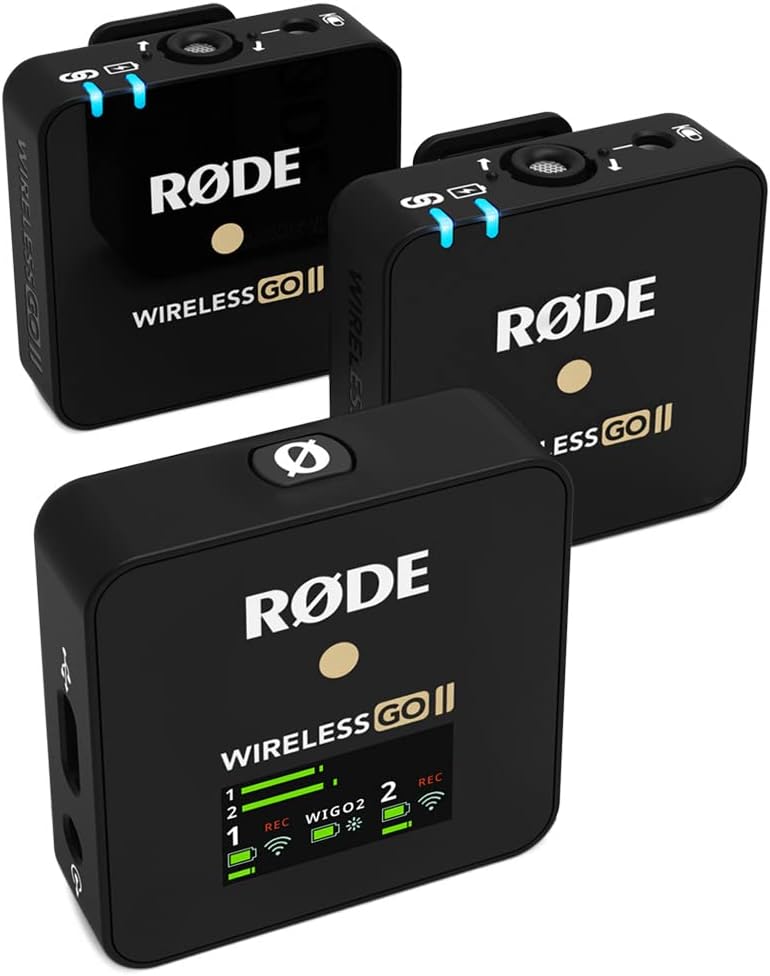
RØDE Wireless GO II
Dual-transmitter wireless kit — the two-person interview standard
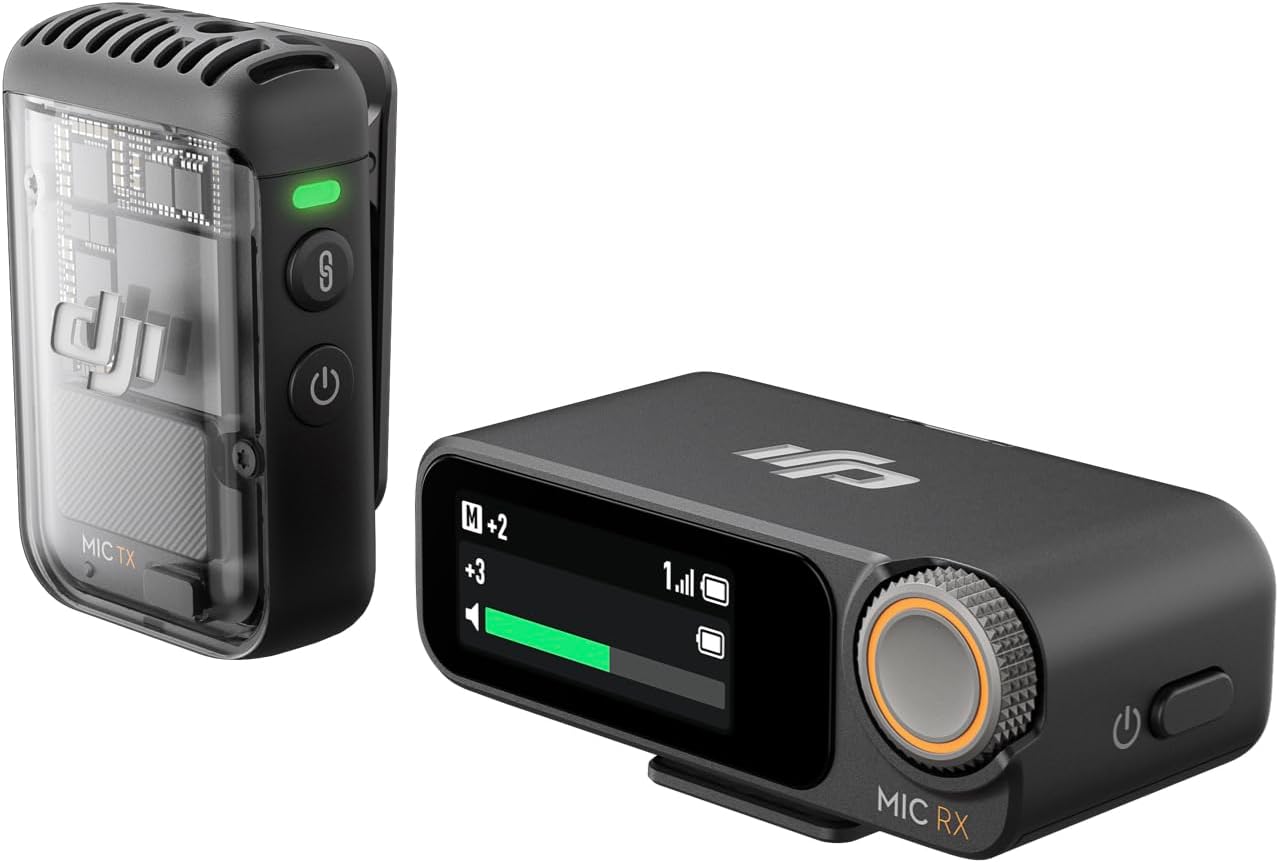
DJI Mic 2
Creator-focused wireless with intelligent noise cancelling — single-transmitter kit
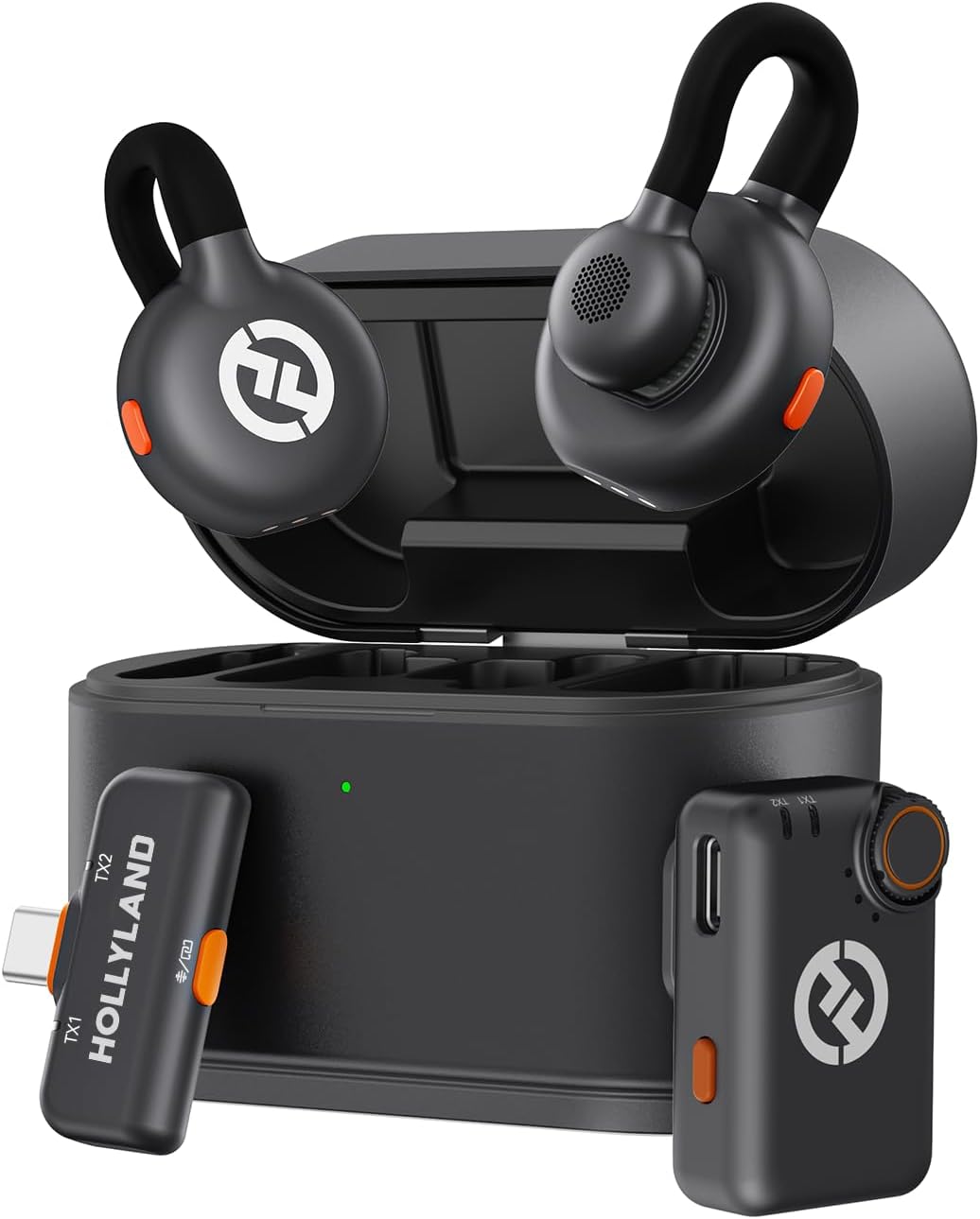
Hollyland Lark M2S
Ultra-mini clip-on form, phone-friendly — the budget-conscious pick
Prices and availability may vary — tap any product to check the current listing.
What to Look For in a Wireless Mic for AI Content Creation
Microphone marketing loves drowning you in specs. For AI creators — voiceovers, podcasts, interviews, course narration — six factors decide whether a wireless system earns its place in your bag.
1. Channels: One Voice or Two?
This fork decides everything else. The Wireless GO II ships as a dual-transmitter kit: two people, two clip-on transmitters, one receiver, both voices captured at once. If you interview guests or co-host a podcast, that second channel isn’t a luxury — it’s the whole product. But if you always record solo, the second transmitter lives in a drawer while you paid for it. Count the second voices in your last ten videos — that number is your answer.
2. Receiver Compatibility: Camera, Phone, or Computer?
A wireless mic is only as useful as the device it plugs into. Camera shooters want a hot-shoe receiver; phone creators want a direct digital receiver that skips dongle gymnastics; desk recordists want computer compatibility without fuss. The Lark M2S leans phone-first, while the GO II and DJI Mic 2 cover the camera-and-computer middle. Buy for the device you record on — not the one you aspire to.
3. Noise Handling: Processing Helps, Placement Wins
“Intelligent noise cancelling” sounds like magic, and modern processing does clean up steady background drone better than it used to. But no algorithm rescues a mic clipped too far from the mouth in a windy parking lot. The hierarchy never changes: mic close first, wind protection second, quiet-ish location third, processing last. Treat noise cancelling as a safety net, not a strategy.
4. Form Factor: How Visible Should the Mic Be?
Size matters more than spec sheets admit. An ultra-mini clip-on like the Lark M2S practically disappears on a lapel — a real advantage for on-camera AI explainers. The GO II’s transmitters are compact but visible; fine for interviews, slightly less elegant for tight talking-head framing. A straight trade-off between discretion and handling confidence.
5. Battery Life and Backup Recording: Surviving the Shoot Day
Wireless means batteries, and batteries mean a new failure mode. For a full interview day, you want endurance that outlasts your schedule with margin — running dry mid-interview is a special pain. Backup recording on the transmitter is the feature you don’t appreciate until a wireless glitch makes your safety copy save the segment. Buy the redundancy that prevents your worst-case failure.
6. Ease of Use vs Control: Plug-and-Play or Tweakable?
Some creators want to clip on and record; others want gain staging, mute control, and safety tracks. The GO II rewards tweakers — its companion app opens settings the hardware buttons don’t show. The Lark M2S and DJI Mic 2 lean simpler out of the box. Mismatching is miserable: a plug-and-play person drowning in menus, or a control freak stuck with auto-everything. Know which one you are.
Which Creator Are You? Match the Mic to Your Workflow
Three profiles, three right answers. The wrong wireless mic isn’t a bad product — it’s a good product bought for the wrong job.
The Solo AI Narrator
You voice AI explainers, narrate courses, or record screen tutorials — one voice, usually at a desk. Uncomfortable truth: if you never leave the desk, a wired USB mic gives cleaner audio per dollar with zero batteries and zero interference. If your narration happens on the move — walking demos, location b-roll — a single-transmitter kit like the DJI Mic 2, with noise-cancelling processing for unpredictable rooms, is the sweet spot.
The Interview and Podcast Duo
Two voices, regularly: co-hosted AI podcasts, guest interviews, street conversations — the Wireless GO II’s home turf. Two transmitters, one receiver, both voices captured cleanly — no passing a mic back and forth. The dual-channel kit exists because faking two-person audio in post is a losing game. If a second voice shows up weekly, get the dual kit.
The Mobile-First Short-Form Creator
Your phone is your studio: film vertical, edit on the phone, publish the same day. You need tiny, direct, dead simple — clip on, plug in the mini receiver, record. The Lark M2S was built for this life: ultra-mini form, phone-friendly receiver, budget-conscious price. The bigger kits add capability your workflow will never touch.
Three Wireless Mic Tiers Compared
| Type / Tier | Best For | Price Tier | Key Feature | Watch-Out |
|---|---|---|---|---|
| Dual-channel wireless kit (RØDE Wireless GO II) | Interviews, co-hosted podcasts, two-person videos | Premium | Two transmitters + one receiver capturing both voices | Wasted money if you always record solo |
| Creator kit with noise cancelling (DJI Mic 2) | Solo creators in unpredictable environments | Mid-range | Intelligent noise cancelling, single-transmitter kit | Only one transmitter — no second voice option |
| Ultra-mini phone-friendly (Hollyland Lark M2S) | Mobile-first creators filming on phones | Budget-friendly | Tiny clip-on form with direct phone receiver | Less tweakable than the bigger kits |
Dual-channel wireless kits win the moment a second voice appears — nothing else captures two people this cleanly without a sound person’s help.
Creator kits with noise cancelling win for solo operators; the processing smooths the unpredictable rooms and street noise solo creators can’t control.
Ultra-mini phone-friendly systems win on simplicity and discretion; for phone workflows, smaller and simpler beats bigger and more capable.
Two Scenarios From Real Creator Setups
Recording a Two-Person AI Podcast in a Noisy Café
You and your co-host, corner table, espresso machine screaming every ninety seconds. Each wears a transmitter; the receiver sits on the table recorder. The mics ride close to your mouths, so your voices dominate and the café becomes background texture. Noise cancelling helps a bit — but proximity is the real hero. Physics beats processing, every time.
Filming Street Interviews With Just a Phone
One creator, one phone, strangers on a sidewalk. Clip the ultra-mini transmitter on your guest, plug the tiny receiver into your phone, recording in thirty seconds — no adapter bag. Wind is the enemy: stand with your back to it, keep the mic close. The gear disappears and the conversation doesn’t feel like a production.
Common Mistakes Wireless Mic Buyers Make
Mistake 1: Buying dual-channel for a solo show. The GO II’s second transmitter is its headline feature — and its most wasted one. Solo narrators buy the dual kit “just in case,” then record alone for two years. Buy for the content you make, not the content you fantasize about.
Mistake 2: Trusting noise cancelling instead of mic placement. Processing is the garnish, not the meal. A mic at the collar in a quiet room beats a noise-cancelling flagship clipped too far away in wind. I’ve seen creators upgrade mics three times when moving the mic two inches closer would have solved it. Two inches. Free.
Mistake 3: Forgetting that wireless means batteries. Nothing ends a shoot faster than a dead transmitter you forgot to charge. Build the habit: charge after every session, not before the next one. A safety copy on the transmitter turns a wireless dropout from disaster into footnote.
Also see: Shure MV7+ Microphone Review: The Best Mic for AI Podcasters and Creators?.
Mistake 4: Using the camera mic “just this once.” Famous last words. “Just this once” becomes the take you can’t reshoot and the audio you spend four hours rescuing in post. The wireless kit lives in your bag so there’s never a reason to compromise. If it’s not in the bag, it’s not in the workflow.
Why This Matters, How to Set Up, What to Check
Why does audio quality matter more than video for AI creators?
Because ears are less forgiving than eyes. Viewers watch slightly soft 1080p without complaint, but echoey or distant audio makes them click away in seconds — physiological, not snobbery. For AI content the stakes are higher: your voice competes with synthetic voiceovers, so thin human audio sounds amateur by direct comparison. A capable wireless mic is the cheapest way to make your voice hold its own.
How do you get clean audio outdoors without a studio?
Four moves, in order of impact. Get the mic close — collar level, a hand’s width from the mouth. Use wind protection; even a light breeze destroys unprotected audio. Position yourself so wind hits your back, not the mic. Pick the quieter side of the street — thirty seconds of scouting beats thirty minutes of cleanup. Do these and even a budget system sounds professional.
What should you test in the first week with a new wireless mic?
Record yourself where you’ll actually use it: your desk, a noisy room, outside. Listen back on headphones — not laptop speakers, which hide everything — and check for dropouts at the far end of the room. Test mute before you need it live. Confirm the receiver plays nicely with your recording device, cables and all. Week one is for discovering incompatibilities.
Questions People Ask Before Buying
Is the Rode Wireless GO II worth it for YouTube and podcast creators?
For creators who record interviews, co-hosted podcasts, or two-person videos, the Wireless GO II is worth it — the dual-transmitter setup captures two clean channels at once, which a single mic simply can’t fake in post, though solo creators who never record a second voice are paying for a channel they’ll never use. Two voices means dual-channel; one voice means a simpler single-transmitter kit.
Rode Wireless GO II vs DJI Mic 2 — which wireless mic should I buy?
Buy the Wireless GO II if you regularly record two people — its dual-transmitter kit is built for interviews and co-hosts — but buy the DJI Mic 2 if you mostly record solo and value its noise-cancelling processing for unpredictable environments. The deciding question is simple: how often does a second voice appear in your content? Weekly or more: GO II. Rarely: the single-transmitter kit wins on value.
Do I need a wireless microphone if I only record at my desk?
Probably not — a desk-bound creator gets cleaner, cheaper audio from a wired USB or XLR microphone, which has no batteries to charge, no wireless interference to fight, and typically better sound per dollar, so wireless only earns its keep the moment you stand up, walk around, or record anyone who isn’t sitting at your desk. If the answer is “this chair, always,” wired is the smarter buy.
Is the Wireless GO II overkill for creators who only film on their phone?
Often yes — phone-only creators usually get more value from an ultra-mini system with a direct phone receiver, which is smaller, simpler, and cheaper, because the GO II’s camera-oriented kit and second transmitter add bulk and cost without adding anything your phone workflow uses. The best wireless mic is the one already clipped on when the moment happens.
Can the Wireless GO II record two people at once?
Yes — that’s the entire point of the dual-transmitter kit: each person wears their own transmitter, both feed into the single receiver, and you get two separate voices captured simultaneously instead of one mic awkwardly shared between two people, making it the standard setup for interviews, co-hosted podcasts, and dialogue-heavy videos. No passing the mic, no leaning in.
Frequently Asked Questions
What does dual-channel mean on a wireless microphone?
Two separate transmitters (one per person) send to a single receiver, so both voices get captured simultaneously as their own channels. For interviews and co-hosted shows, that’s the difference between clean audio and one person fading in and out.
Will the Wireless GO II work with my phone?
It depends on the connection — the GO II is primarily a camera-and-computer kit, and phone use requires the right cable or adapter for your model. Check the current listing for what’s in the box, and confirm phone compatibility before ordering if that’s your main use.
How do I reduce wind noise when recording outside?
Clip the mic close to the mouth, stand with your back to the wind, and use the wind protection in the box. Then pick a sheltered spot — a wall or parked car blocks more wind than any foam cover. Processing helps with leftovers; placement does the heavy lifting.
Is a wireless lavalier better than a USB mic for AI voiceovers?
For desk-bound voiceovers, usually not — a wired USB mic gives cleaner audio per dollar with no batteries and no wireless link to worry about. Wireless wins away from the desk: walking demos, location narration, anything with movement.
Do I need two transmitters if I always record solo?
No — that’s the most common overspend in this category. If a second voice never appears in your content, the second transmitter is dead weight. A single-transmitter kit covers solo recording, usually costs less, and means one fewer battery to babysit.
Where can I buy the Rode Wireless GO II?
The Wireless GO II is available through major retailers and widely available online — check current availability. Use the links on this page to see the current listing and compare it against the single-transmitter and mini alternatives before deciding.
Final Recommendation
Get the RØDE Wireless GO II if two voices show up in your content regularly — interviews, co-hosted podcasts, dialogue videos. Both voices captured cleanly, no mic-sharing awkwardness, no post-production rescue missions. Check the current Wireless GO II listing and confirm the kit matches your recording device first.
Get the DJI Mic 2 if you record solo in unpredictable places and want noise-cancelling processing doing the heavy lifting. Get the Lark M2S if your phone is your studio. And if you never leave your desk? A wired mic still beats all three on value.
OUR TOP PICK
RØDE Wireless GO II
Dual-transmitter wireless kit — the two-person interview standard
Decision Tree: Which Wireless Mic Should You Get?
If you regularly record two voices → get the RØDE Wireless GO II. The dual-transmitter kit is built exactly for interviews and co-hosted shows.
If you record solo in unpredictable places → get the DJI Mic 2. Single transmitter plus noise-cancelling processing for real-world chaos.
If your phone is your studio → get the Hollyland Lark M2S. Ultra-mini, phone-friendly, and the simplest path to clean mobile audio.
Key Takeaways
The Wireless GO II is the two-person standard: dual transmitters, one receiver, both voices captured cleanly.
Audio matters more than video — viewers forgive soft footage but abandon bad audio within seconds.
Solo creators usually waste money on dual-channel; desk-bound narrators are often better served by a wired mic.
Disclosure: As an affiliate partner, we may earn a commission from qualifying purchases made through links on this page — at no extra cost to you.