
Disclosure: This page contains affiliate links. If you buy through them, we may earn a commission at no extra cost to you — it helps us keep publishing free, in-depth reviews.
Blue Yeti USB Microphone Review: Still the Best Mic for AI Content Creators?
The Blue Yeti USB microphone has been the default pick for podcasters, streamers, and voiceover creators for over a decade — but compact rivals now promise cleaner sound in smaller packages. This guide breaks down whether the Yeti still earns its desk spot, especially for AI-narrated videos, podcasts, and home voice content.
Related reading: Rode Wireless GO II Review: The Wireless Mic AI Content Creators Actually Need?, Shure MV7+ Microphone Review: The Best Mic for AI Podcasters and Creators?.
Quick Answer
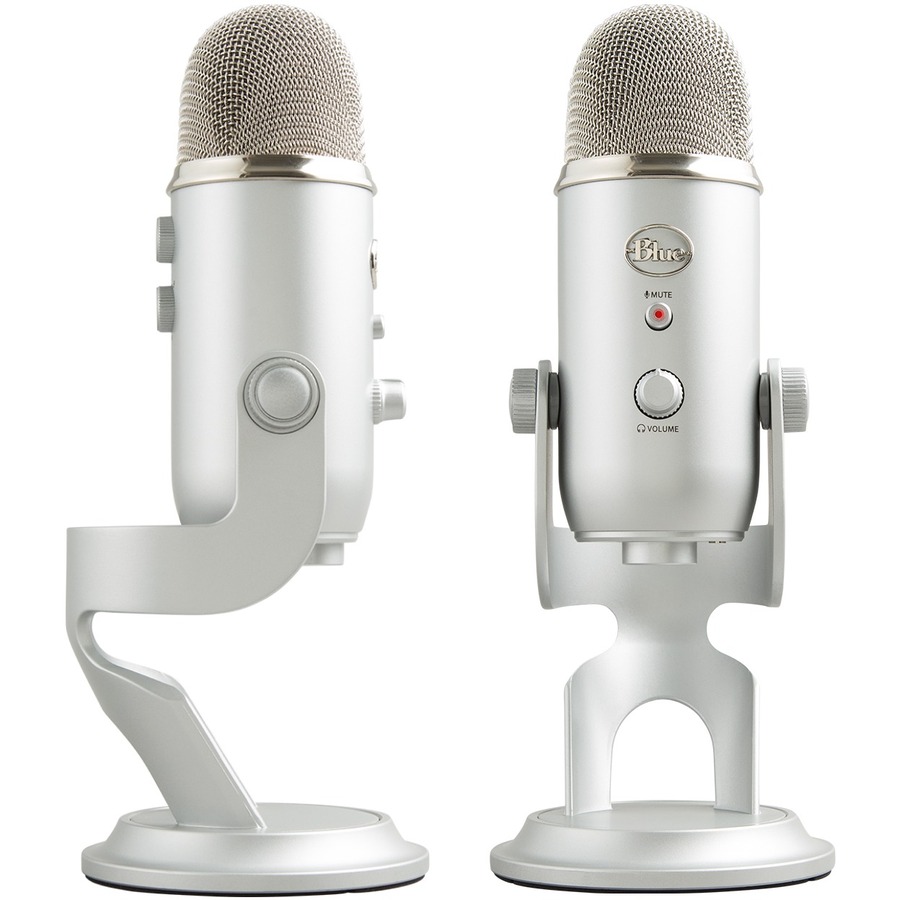
The Blue Yeti remains a capable USB mic for solo voice, streaming, and two-person interviews — four pickup patterns are still rare at this price. But it’s big, heavy, and noisier than newer compact mics. Buy it for versatility; pick the Rode NT-USB Mini or AT2020USB+ if desk space or background noise is your main headache.
Compare Top USB Microphones
Three proven picks side by side — choose the one that fits your needs.
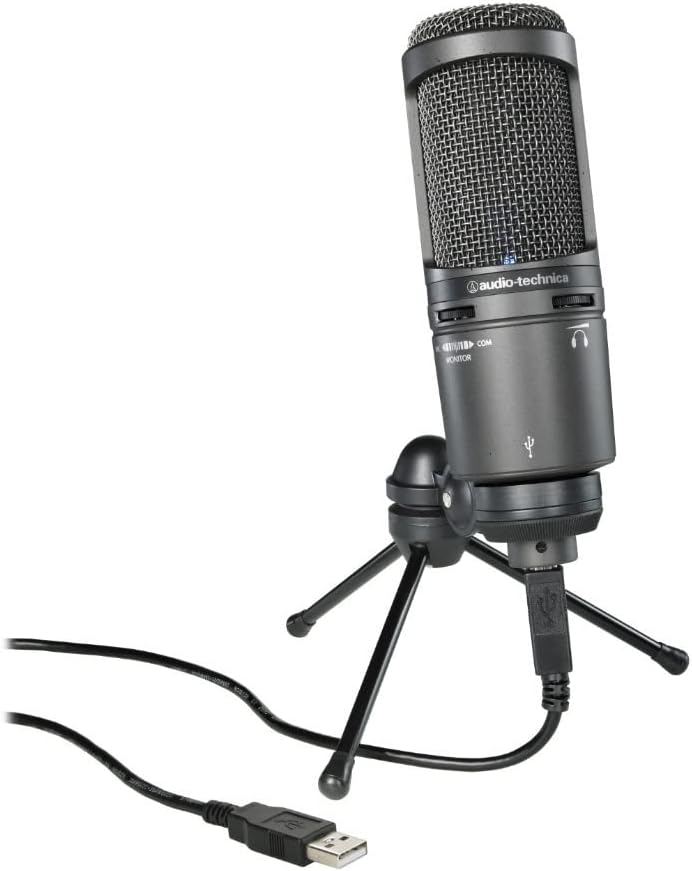
Audio-Technica AT2020USB+
Studio condenser sound · focused cardioid pickup
Prices and availability may vary — tap any product to check the current listing.
What to Look For in a USB Microphone
Buying a USB mic looks simple until you plug one in and hear your room for the first time. Every space has a sound — the fridge hum, traffic through a thin wall, keyboard rattle — and a sensitive condenser finds all of it. Here’s what separates a mic you’ll love from one you’ll quietly replace.
Pickup pattern flexibility
Cardioid grabs what’s in front and ignores the sides and rear — the workhorse for solo voice, used 95% of the time. The Yeti’s trick: it also offers bidirectional (two-person interviews), omnidirectional (the whole room), and stereo (music). Most USB mics give you cardioid only. That matters the day a guest sits across your desk — the Yeti just needs a knob turned, while a single-pattern mic needs a second mic. The catch? Extra patterns collect more room noise, not less.
Plug-and-play versus an upgrade path
USB mics exist for one reason: plug in and record. No interface, no preamp, no cable spaghetti. For creators whose real job is making videos — not engineering audio — that simplicity is the point. The ceiling: XLR plus an interface gives cleaner gain and a real upgrade path, while USB locks you into the mic’s built-in electronics. Will you still use this exact mic in three years? If not, USB is still the right first mic. Just not your last.
Desk and room noise handling
Where the Yeti shows its age. Its large triple-capsule design sounds full — but sensitivity cuts both ways, and keyboard clacks and room echo arrive loud. The stock stand has no shock isolation, so every tap travels up into the recording. Newer designs were built around this complaint: the Mini’s smaller capsule and processing tame harsh reflections, and the AT2020USB+’s tighter cardioid rejects more side noise. No mic fixes a bad room. Some punish you less.
On-mic monitoring and controls
The Yeti puts real knobs on the mic: gain, headphone volume, mute, pattern selector. Trivial — until you’re digging through software menus mid-recording. The zero-latency headphone jack lets you hear yourself with no delay, catching off-mic moments during the take instead of in editing. The AT2020USB+ matches it. Physical controls win for frequent recorders.
Size and desk footprint
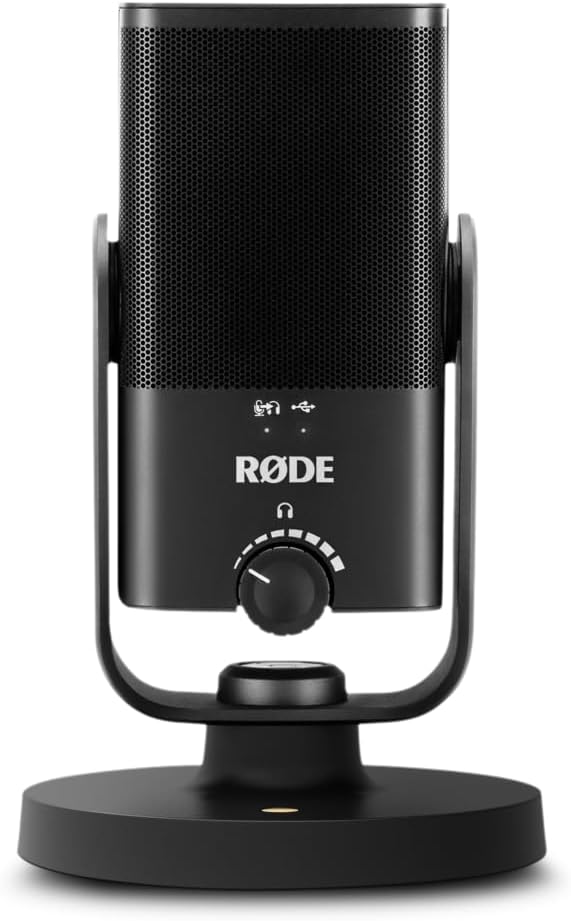
I’ve watched creators buy an impressive mic, then park it three feet away because it ate their desk. The Yeti is chunky — tall, heavy, wide base. It looks serious on camera, but dominates a small desk. The AT2020USB+ and especially the Mini take up far less space, and the Mini pops off its magnetic stand in seconds for a boom arm. Measure your desk first.
Build quality and longevity
The Yeti’s quiet superpower: built like a tank, with early units still recording daily. Metal body, solid knobs, no flimsy hinges. In a category where budget mics develop crackling jacks within a year or two, that track record counts — and the AT2020USB+ and Rode share similar reputations. Buy once, cry once… or buy cheap twice.
How to Match a USB Mic to Your Situation
Forget “best mic.” The right mic fits how you actually record. Three creators, three answers.
The AI voiceover creator
You record narration for faceless videos in a spare bedroom. Your enemies are echo and mouth noise, not missing features. A tight cardioid mic kept close beats a fancy multi-pattern mic at arm’s length, every time. The Yeti works only with cardioid mode, close technique, and low gain. Echoey room you won’t treat? The Mini’s processing is more forgiving.
The streamer or podcaster
You’re live at your desk, keyboard clacking. You need a mic that rejects the desk and flatters your voice without fiddling. The Yeti’s cardioid mode handles this with conservative gain — and it looks good on camera, which matters more than audio snobs admit. Loud mechanical keyboard? The AT2020USB+ or Mini saves editing time.
The interviewer
Two people, one desk, one mic — the Yeti’s home turf. Flip to bidirectional and both voices land in one track. The AT2020USB+ and NT-USB Mini can’t do this; they’re solo-voice mics, full stop. If interviews are part of your format, the Yeti isn’t just a good choice. It’s the only choice here.
USB Microphone Types Compared
| Type / Tier | Best For | Price Tier | Key Feature | Watch-Out |
|---|---|---|---|---|
| Multi-pattern flagship USB (e.g. Blue Yeti) | Versatile creators, interviews, roundtables | Mid-range | Four switchable pickup patterns | Large, heavy; picks up more room noise |
| Studio-style cardioid USB (e.g. AT2020USB+) | Solo voice, podcasting, voiceover | Mid-range | Focused condenser sound, tight pickup | Single pattern only; no multi-person option |
| Compact DSP USB (e.g. Rode NT-USB Mini) | Small desks, untreated rooms, beginners | Mid-range | Built-in processing, tiny footprint | Less “full” low end than larger capsules |
| Budget condenser USB (generic entry models) | Trying out content creation on a budget | Budget-friendly | Cheap way to beat a headset mic | Thin sound, fragile build, noisy electronics |
The multi-pattern flagship is the Swiss army knife — interviews brilliantly, but size and sensitivity are real trade-offs.
The studio-style cardioid is the specialist: a more focused sound for one voice, slightly better side-noise rejection.
The compact DSP mic answers the Yeti’s weaknesses — smaller, smarter about bad rooms, easier on a crowded desk.
The budget tier proves a point: anything beats a laptop mic, but you’ll outgrow it fast recording weekly.
Real Recording Scenarios
Scenario 1: AI narration in an untreated spare bedroom
Bare walls, hardwood floor — the classic echo chamber. Uncomfortable truth: here, a pricey mic and a cheap one sound similar, because the room dominates. The fix is technique: cardioid, six inches from your mouth, gain low, a blanket behind you if ambitious. The Yeti handles this fine. The Mini slightly better. Get close — distance is the enemy.
Scenario 2: Streaming with a mechanical keyboard nearby
Your viewers hear what the mic hears, and the mic hears everything. With the Yeti: cardioid mode, gain down, mic close to your mouth and far from the keyboard. Angle it so the keyboard sits behind the mic, in the pattern’s rejection zone. Works — mostly. Clacks still bleeding through? That’s the AT2020USB+ or Mini earning its keep.
Scenario 3: A two-person interview at one desk
Co-host across from you, one mic between you. Switch the Yeti to bidirectional and you’re recording — no second mic, no mixer. This scenario justifies the Yeti in 2026. Keep both speakers equidistant or one dominates. Trade-off: bidirectional hears the room behind both of you. Close the window.
Common Mistakes Buyers Make
Mistake 1: Recording solo voice in stereo or omni mode. For one voice in one room, cardioid wins every time — stereo just gives you twice the room noise in a wider image. Use cardioid. Always.
Mistake 2: Cranking the gain to “sound louder.” High gain makes the mic hear more, including everything unwanted. Gain low, get close, normalize in editing. Quiet recording, loud result.
Also see: Logitech Brio 4K Webcam Review: The Best Camera for AI Video Creators?.
Mistake 3: Sitting too far from the mic. Two feet out, even a great condenser sounds thin. Six to eight inches is the sweet spot. Feels weirdly close at first. Your recordings will thank you.
Mistake 4: Skipping the headphone jack. Zero-latency monitoring catches problems while recording — off-mic, gain too hot, neighbor mowing. Monitor every session.
Why, How, and What: Quick Answers
Why does the Blue Yeti have four pickup patterns when most mics have one?
It was designed as the one-mic solution for creators who do a bit of everything — solo voice today, an interview tomorrow. Modern rivals dropped the extras to shrink the mic and cut costs, betting (correctly, for most) that solo recording is all people do. Versatility or bloat? Depends on your format.
How far should you sit from a Blue Yeti?
Six to eight inches, cardioid mode, speaking into the front — the logo side, not the top, a mistake half of all Yeti owners make once. Closer means fuller sound, less room. More than a foot away and you’re not using a Yeti — you’re using a room with a Yeti in it.
What does the headphone jack on the mic actually do for you?
Real-time, zero-delay monitoring straight from the hardware. Computer monitoring always lags — maddening to talk over. Plug in, hit record, and you’ll instantly hear if you’re too quiet, too loud, or off-axis. The cheapest quality-control tool in your setup.
Questions People Ask Before Buying
Is the Blue Yeti still worth buying in 2026?
Yes, if you want a proven plug-and-play USB mic with multiple pickup patterns at a mid-range price — but only if your use case fits its strengths, because newer compact mics match its sound quality while taking up far less desk space and handling room noise better. Its moat is versatility: no rival here does two-person interviews with one mic.
Blue Yeti vs. Audio-Technica AT2020USB+: which mic should I buy?
Buy the Blue Yeti if you need multiple pickup patterns for interviews or roundtables, and buy the AT2020USB+ if you record solo voice only — the AT2020’s single cardioid pattern and tighter pickup sound slightly more focused for one voice, while the Yeti wins on versatility. One voice: AT2020. Varied formats: Yeti.
Blue Yeti vs. Rode NT-USB Mini: which is better for a small desk?
The Rode NT-USB Mini is the better pick for a small desk because it’s roughly half the size, sits on a compact magnetic stand, and its built-in processing tames harsh room reflections — the Yeti sounds fuller but its large body and heavy stand eat desk space and catch more keyboard noise. Small desk: Mini. Varied formats: Yeti.
Do I need an audio interface with the Blue Yeti?
No — the Blue Yeti connects straight to your computer over USB and needs no audio interface, drivers, or extra hardware, which is exactly why beginners love it; you’d only need an interface if you switch to an XLR microphone later. For most creators, a fine deal.
Will the Blue Yeti pick up my keyboard and background noise?
Yes, more than most rivals — its large condenser capsule is sensitive by design, so mechanical keyboards, mouse clicks, and room echo come through clearly unless you record in cardioid mode, sit close to the mic, and keep the gain low on the front dial. Clacky keyboard daily? A tighter mic causes fewer headaches.
FAQ
Does the Blue Yeti work with a phone or tablet?
It can, with caveats — the Yeti draws more power than most phones deliver, so expect adapter gymnastics. A mic designed for mobile causes fewer headaches.
Can I use the Blue Yeti for music recording?
For demos and scratch vocals, sure — that’s what the stereo pattern is for. But it’s one USB mic, not a studio chain.
Why does my Blue Yeti sound echoey?
Nine times out of ten, it’s distance plus gain: two feet away with gain cranked means the mic hears more room than voice. Move to six inches, drop the gain, stay in cardioid. Still cave-like? Rugs, curtains, clothes behind you.
Is the Blue Yeti good for two people recording at once?
Genuinely its strong suit: bidirectional mode, mic between you, both voices in one track. Keep equidistant, close windows.
Does the Blue Yeti need a pop filter or shock mount?
A pop filter tames plosives; a shock mount helps if your desk transmits vibrations. Cheap fixes for its two biggest physical weaknesses.
How do I stop the Blue Yeti from picking up desk vibrations?
Get it off the desk — a boom arm with shock mount is the single biggest Yeti upgrade. Or rest the stand on a folded towel.
Final Recommendation
The Yeti earns its recommendation the old-fashioned way: it does the job, in more situations than its rivals, year after year. Interviews, co-hosts, varied formats — or one mic that handles whatever you throw at it — it’s still the sensible pick. Knobs, patterns, tank build: none flashy, all working.
But don’t buy the legend instead of the mic. Solo voice on a small desk in an untreated room? The Mini is smarter and more forgiving. Solo voice with maximum vocal focus? The AT2020USB+ edges it. Match the mic to the work.
Decision Tree: Which USB Mic Should You Buy?
Interviews or two-person conversations → Blue Yeti — bidirectional, no second mic needed.
Solo voice, small desk, untreated room → Rode NT-USB Mini — compact, forgiving.
Solo voice, maximum vocal focus → AT2020USB+ — tighter cardioid pickup.
Maximum versatility in one purchase → Blue Yeti — four patterns, proven record.
Key Takeaways
✅ The Blue Yeti’s four pickup patterns remain its defining advantage — especially bidirectional mode for two-person recording.
✅ It’s large, heavy, and more sensitive to room noise than modern compact rivals; technique (cardioid, close, low gain) matters more than the mic.
✅ AT2020USB+ for solo-voice purists; NT-USB Mini for small desks and untreated rooms.
✅ No USB mic fixes a bad room — proximity and low gain beat any spec sheet.
Disclosure: This page contains affiliate links. If you buy through them, we may earn a commission at no extra cost to you — it helps us keep publishing free, in-depth reviews.